
How Lead3r Works
Lead3r turns the websites you already browse into qualified, structured business leads — in one click.
No scraping. No automation. No background crawling. Just human-triggered extraction, AI-powered qualification, and clean exports you can actually use.
No credit card required.
The Simple Idea Behind Lead3r
Most prospecting tools try to automate everything.
Lead3r does the opposite.
You decide which pages matter.
You open them normally.
You trigger extraction when you’re ready.
Lead3r simply turns visible page data into structured leads — instantly.
No credit card required.
The 3-Step Lead3r Workflow

Step 1: Browse Normally
Visit a supported platform the same way you already do.
This could be a:
- Company page
- Business listing
- Seller profile
- Agency profile
- Review page
If you can see it in your browser, Lead3r can work with it.
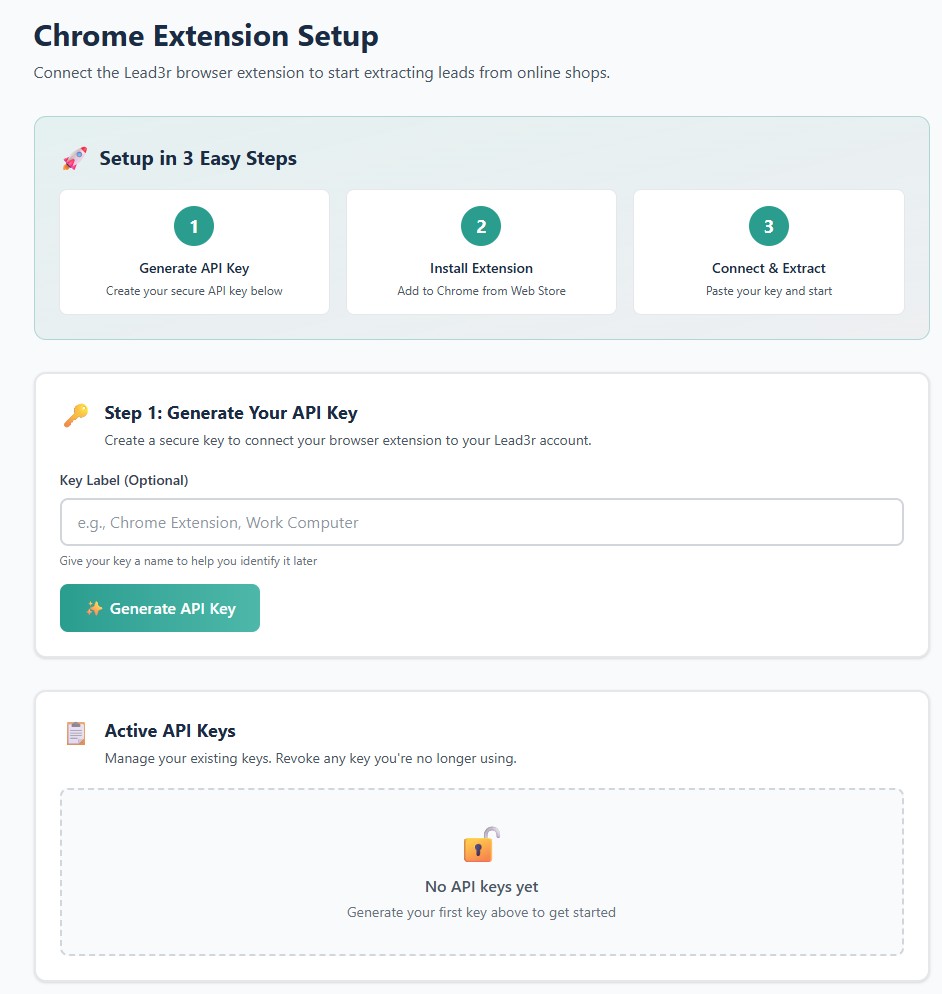
Step 2: Click “Extract Lead”
When you’re on a supported page, click the Lead3r extension.
Lead3r reads only what’s visible on that page and converts it into a structured lead.
Nothing runs automatically.
Nothing happens in the background.
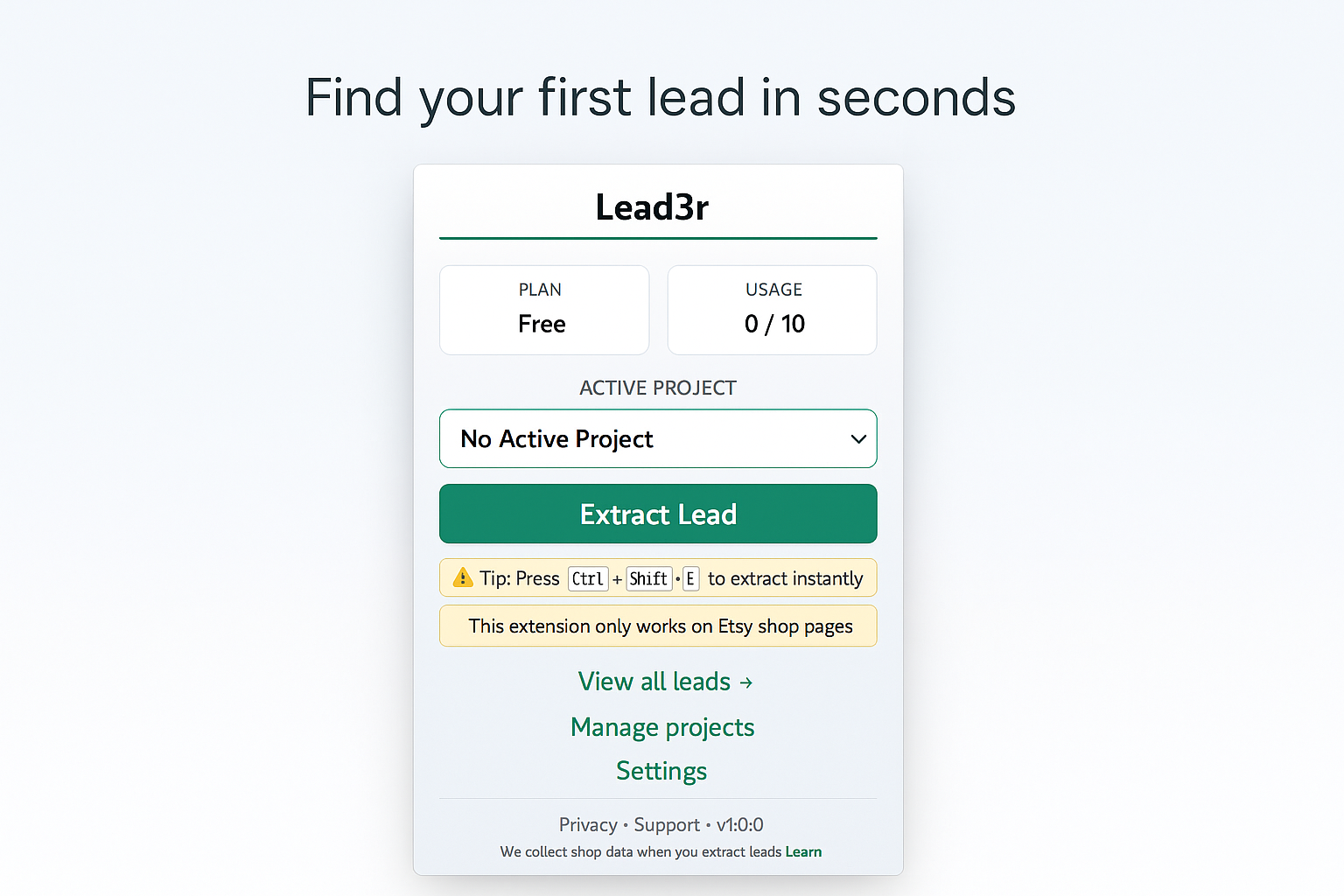
Step 3: Review, Qualify, and Export
Your extracted lead is instantly enriched and ready to use.
You can:
- Review key business signals
- Compare leads consistently
- Export clean CSVs
- Decide who’s worth contacting — and who isn’t
Takes under a minute from install to first lead.
Try the 3-Step Workflow Yourself
No credit card required.
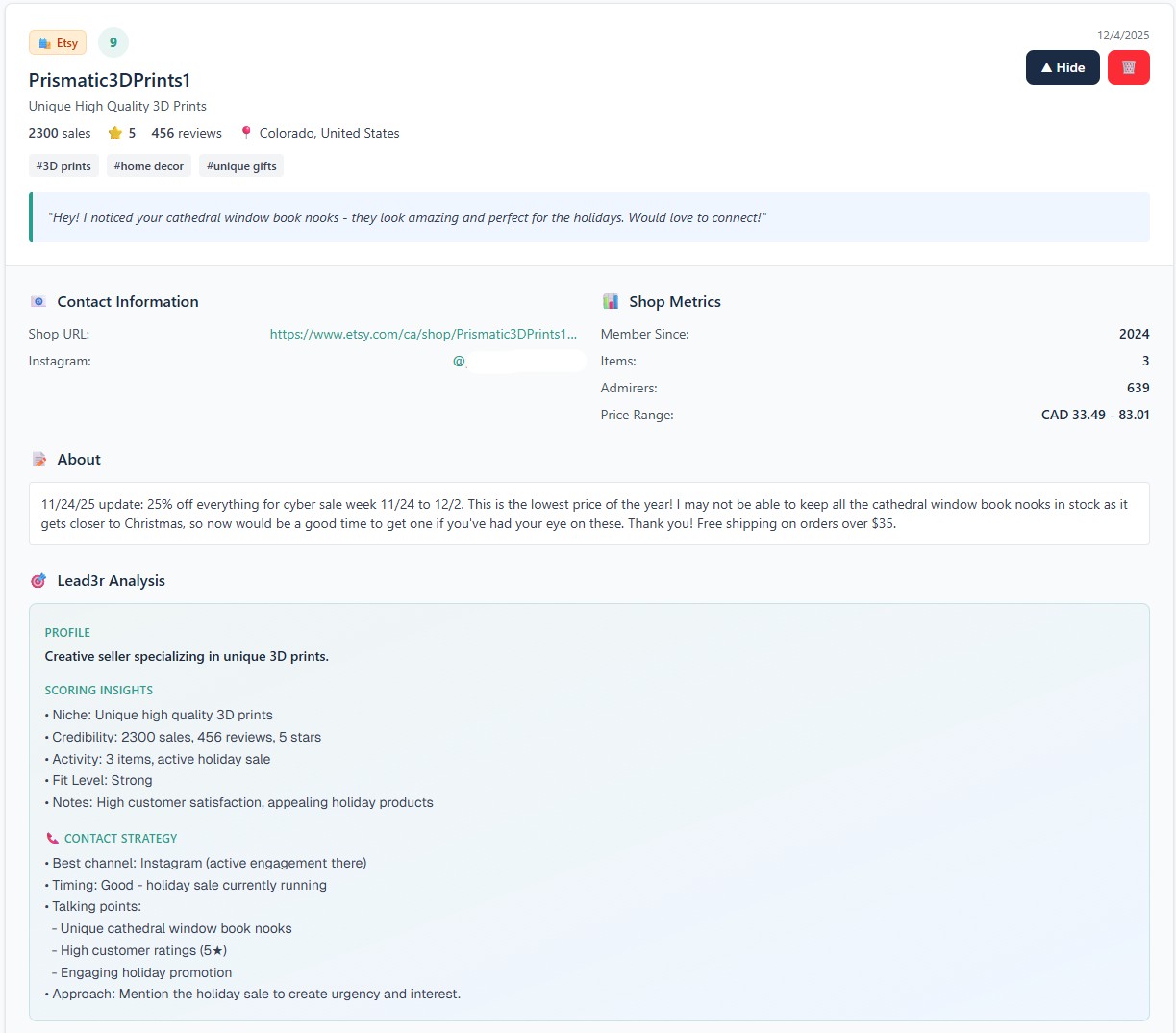
What You Get When You Extract an Etsy Shop With Lead3r
Lead3r doesn’t just copy data — it adds decision context.
Built for Stability and Safety
Lead3r is intentionally designed to avoid the patterns that cause tools to break or get blocked.
- No scraping
- No bots
- No automation
- No background crawling
- No bulk requests
Everything is triggered by you, on pages you already opened.
This makes Lead3r more stable and safer than automation-heavy prospecting tools.
No credit card required.
Works Across Multiple Platforms
Lead3r supports a growing list of high-intent platforms, including:
Lead3r supports a growing list of high-intent platforms, including:
- LinkedIn Company Pages
- Google Maps Business Profiles
- Indeed Company Pages
- Yelp Business Pages
- Etsy Shops
- Fiverr Seller Profiles
- Trustpilot Business Profiles
- BBB Profiles
- Clutch Agency Profiles
- Hotfrog Listings
- Houzz Business Profiles
- Manta Business Pages
- Import/export intelligence platforms
Each platform has its own extraction logic and qualification signals — not a generic scraper.
Full Workflow Example
1. Open a supported business profile
- Lead3r detects the page instantly — no configuration or setup required.
2. Click “Extract Lead”
Your free API key connects automatically and prepares the data for enrichment.
3. Review structured data and signals
In seconds, you’ll see a complete, AI-enriched profile with shop signals, keywords, summaries, and scoring.
4. Decide whether the business is worth contacting
Every extraction is stored in your dashboard where you can organize, revisit, and export as needed.
5. Export or move on — confidently
Leads are formatted in clean, column-based structure ready for CRMs, outreach tools, or spreadsheets.
Who Lead3r Is Built For
Lead3r is designed for people who care about lead quality.
- Freelancers doing targeted outreach
- Agencies prospecting clients
- Consultants qualifying businesses
- Sales teams researching accounts
- Operators sourcing partners or vendors
- Anyone who wants vetted prospects fast
No credit card required.
No. Lead3r does not scrape websites and does not run automated crawlers. It only reads information that is already visible on the page you are viewing and extracts it when you manually trigger the action. Nothing runs automatically and no background data collection occurs.
Scraping and automation tools operate by crawling pages in bulk, simulating user behavior, or running scripts in the background. Lead3r works only when you are actively browsing and choose to extract a lead. This avoids automation patterns that commonly lead to broken tools, blocked access, or account risk.
Lead3r is designed to reduce risk by avoiding automation, background browsing, and bulk extraction. You control when extraction happens, and it only occurs on pages you have already opened manually. This makes Lead3r significantly safer than scraper-based prospecting tools.
Lead3r is not affiliated with or approved by any supported platform. It is designed to work on publicly visible pages you already access manually. By avoiding scraping, automation, and crawling behavior, Lead3r is built to minimize the risks commonly associated with automated tools.
No. Lead3r does not require API access, platform credentials, or special permissions. If you can view the page in your browser, Lead3r can extract the visible information from that page when you choose to do so.
Lead3r works on supported company pages, business listings, seller profiles, agency profiles, and review pages across supported platforms. Each platform has its own extraction logic designed around the structure and signals shown on those pages.
No. Lead3r only extracts information that is visible on the page at the time you view it. It does not access private dashboards, logged-in employer tools, applicant data, or hidden content.
No. Lead3r never runs in the background and does not collect leads automatically. Every extraction is triggered manually by you on a specific page you are viewing.
No. Lead3r does not send emails, messages, or outreach of any kind. It is a research and qualification tool designed to help you decide which businesses are worth contacting. All outreach remains fully under your control.
Once a lead is extracted, Lead3r structures the data, enriches it with platform-specific signals, and generates AI-assisted summaries to help with qualification. You can review the lead, export it, or skip it entirely.
Lead3r uses AI to summarize extracted data, highlight relevant signals, and suggest outreach context. It does not generate spam, send messages, or make automated decisions on your behalf.
Yes. All extracted leads can be exported as clean CSV files that are ready for use in spreadsheets, CRMs, or outreach tools without additional formatting.
Lead3r extracts data directly from the page you are viewing at the time of extraction. Accuracy reflects what is currently displayed on that page. AI-generated summaries are provided for convenience and context, not as authoritative data.
Lead3r is designed to be resilient to layout changes and is updated as platforms evolve. Because extraction is human-triggered and platform-aware, it is more stable than tools that rely on brittle scraping scripts.
Lead3r is built for freelancers, agencies, consultants, sales teams, operators, and anyone who needs to qualify real businesses quickly before reaching out. It is not designed for mass scraping or bulk list generation.
Lead3r runs as a Chrome extension in your browser. All extraction happens locally when you choose to extract data from a supported page.
No. You can start using Lead3r and extract leads without providing a credit card.
Lead3r only processes the data you choose to extract and does not collect data in the background. Your extracted leads are stored and exported based on your actions and settings.
Lead lists are often outdated, unqualified, and disconnected from real context. Lead3r lets you qualify businesses directly from the platforms where real signals live, so you can make informed decisions instead of guessing.
Lead3r is built around one idea: better choices lead to better outreach. Instead of automating everything, it gives you structured data, real signals, and full control so you can decide who is worth your time.
Start Extracting Better Leads in Seconds
Stop guessing. Stop copying data manually. Start qualifying leads properly.
No credit card required.