
Stop Guessing Which Local Businesses Are Worth Contacting.
Turn Google Maps Business Profiles into qualified local leads — instantly.
Lead3r transforms visible Google Maps business profiles into clean, structured, export-ready lead data so you can quickly evaluate relevance, credibility, and outreach readiness — without manual research or risky automation.
No credit card required

The Real Problem With Google Maps Prospecting
Google Maps is where local demand lives.
It’s not built for lead qualification.
Search results are noisy
High-intent businesses sit next to outdated, inactive, or low-quality listings.
Key signals are scattered
Categories, reviews, photos, hours, and websites all matter — but they’re hard to compare across multiple businesses.
Manual research doesn’t scale
Opening listings one by one, copying details, and tracking context quickly becomes slow and inconsistent.
Spreadsheets break immediately
Local context disappears once you paste raw Maps data into rows.
Automation tools introduce risk
Scrapers and bots trigger blocks, CAPTCHAs, and instability — especially on Google properties.
Google Maps prospecting shouldn’t be this fragile.
Lead3r turns Google Maps browsing into structured local business intelligence.
- No scraping
- No blocking
- No broken scripts
- No spreadsheets
- No lost time
Just clean, comparable Google Maps lead data you can actually act on.
No credit card required!

Why Lead3r Works Perfectly With Google Maps
Everything You Need to Qualify a Google Maps Business — Instantly
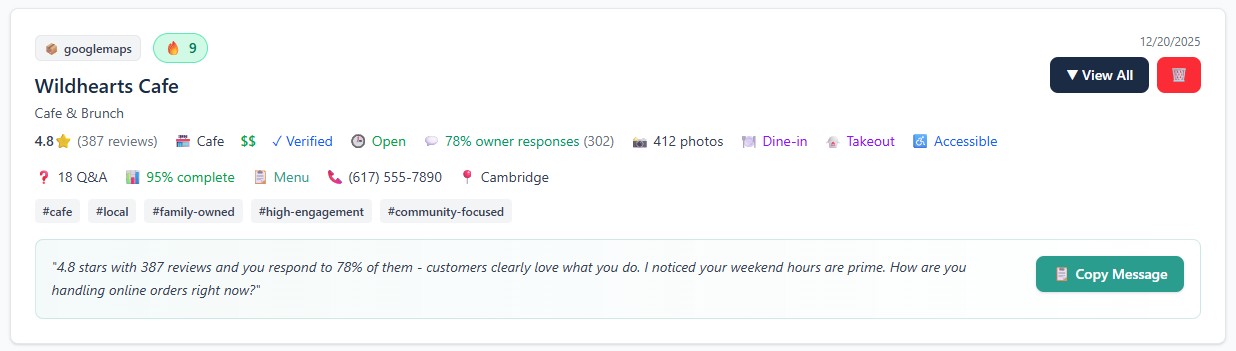
Business Overview & Categories
Extract business name, primary category, secondary categories, and description into a clean, structured profile.
You immediately understand what the business does and how it positions locally.
Location, Service Area & Contact Data
Capture address, service areas, phone numbers, websites, and hours of operation when available.
This helps you determine outreach readiness instantly.
Reviews, Ratings & Activity Signals
Surface review counts, ratings, recency indicators, and visible engagement cues.
These signals help you identify active, reputable businesses and avoid stale listings.
Local Presence & Credibility Indicators
Surface website presence, photo activity, and profile completeness signals that indicate seriousness and legitimacy.
These cues are critical for local outreach success.
What Lead3r Does For You
Data Lead3r Extracts From Google Maps Business Profiles
Lead3r extracts only information that is visible on Google Maps Business Profiles at the time you view them.
This includes business identity details, categories, reviews and ratings, contact and location data, service area indicators, activity signals, and AI-generated summaries designed to support faster local lead qualification.
Check out what clients say
Lead3r started as a tool I built for myself — to stop wasting time copy-pasting data and writing outreach messages manually. It saved me hours every week, and early testers began asking for access. Now it saves creators, freelancers, and shops real time every day.
Robert M
Founder of Lead3r
Used weekly by freelancers, agencies, and service providers targeting b.
No. Lead3r does not scrape Google Maps or run automated crawlers. It only reads information that is already visible on Google Maps Business Profiles and extracts it when you manually trigger the action. Nothing runs automatically, and no background data collection occurs.
Lead3r is designed to minimize risk by operating only when you manually extract data from a Google Maps profile you are actively viewing. It does not automate browsing, run bots, or perform background actions, making it significantly safer than scraper-based tools that trigger blocks or CAPTCHAs.
Lead3r is not affiliated with or approved by Google. It is designed to work on pages you already open and interact with manually. By avoiding automation, crawling, or scripted activity, Lead3r is built to reduce the risks commonly associated with Google Maps scraping tools.
No. Lead3r does not require a Google account, Google API key, or Google Maps API access. As long as you can view a Google Maps Business Profile in your browser, Lead3r can extract the visible information from that page.
Lead3r works on standard Google Maps Business Profiles that are publicly visible. If the business profile appears in Google Maps in your browser, Lead3r can extract the relevant business, category, review, and contact information shown on the page.
Lead3r extracts structured data that is visible on the Google Maps profile, including business name, categories, address, service areas, phone number, website links, reviews and ratings, activity indicators, and other visible credibility signals used to evaluate whether a business is worth contacting.
Lead3r extracts data from individual Google Maps Business Profiles that you open. It does not automatically crawl search results, scan multiple listings at once, or perform background data collection.
No. Lead3r does not send emails, make calls, submit forms, or contact businesses on your behalf. It is strictly a research and qualification tool. All outreach decisions and actions remain fully under your control.
Google Maps lead extraction is best suited for agencies, consultants, sales teams, founders, and operators who prospect local businesses. It’s ideal for users who want to qualify relevance, activity, and credibility before starting outreach, rather than blindly contacting every listing.
Yes. You can export enriched Google Maps business leads as clean CSV files. The exported data is structured and ready for use in spreadsheets, CRMs, or outreach tools without additional cleanup.
Lead3r extracts data directly from the Google Maps profile you are viewing at the time of extraction. The accuracy reflects what is currently displayed on the page and is preserved exactly, with AI-generated summaries added only to support faster qualification.
Lead3r is designed to be resilient to layout changes and is updated as needed to maintain compatibility. Because extraction is human-triggered and layout-aware, it is more stable than brittle scraping tools that rely on fixed page structures.
No. You can try Lead3r and extract your first Google Maps leads without providing a credit card, allowing you to evaluate the workflow before upgrading.
No. Lead3r is an independent tool and is not affiliated with, endorsed by, or approved by Google. It works with publicly visible Google Maps Business Profiles in a human-triggered, non-automated way.
Lead3r runs as a Chrome extension in your browser. All extraction happens when you are actively viewing Google Maps Business Profiles and choose to extract data.
Yes. Lead3r only processes the data you choose to extract and does not perform background collection or hidden automation. Your extracted leads are stored and exported according to your actions and settings.
Start Extracting Qualified Google Maps Leads in Seconds
Turn Google Maps browsing into structured, qualified local business leads — without scraping or automation risk.